AGUI with Chainlit — Building a Production Chat Frontend for an AI Agent
The agent GUI is where every backend shortcut becomes visible: tokens expire mid-chat, resumed threads render blank, streamed answers appear twice. Here’s a Chainlit frontend that survives production — real OIDC with a two-hostname split, mid-chat token refresh, persisted threads with interactive Plotly charts, and the fixes for the failure modes you only meet after you persist.
Agent demos treat the UI as an afterthought — a chat box taped over an API. Then real users arrive, and the UI turns out to be the layer with the most state: login sessions, websocket connections, streamed partial messages, thread history, rich widgets that must survive a page reload three weeks later.
This article walks the Chainlit frontend of a conversational loan agent. The design constraint that shapes everything: the UI is domain-agnostic. It POSTs {prompt, customer_name, conversation_id} to the agent’s /invocations endpoint and renders the streamed response — the same code path serves a local container and a deployed AWS Bedrock AgentCore runtime, switched by one env var. All loan logic lives behind that endpoint; the UI’s job is transport, identity, rendering, and persistence.
01 / 06 · One dumb pipe
The UI is domain-agnostic: it POSTs {prompt, customer_name, conversation_id} to the agent’s /invocations endpoint and renders the streamed events. All loan logic lives behind that pipe — the same code serves a local container and a deployed AgentCore runtime.
02 / 06 · Identity
A real authorization-code login against Keycloak — no demo password gate — with tokens that renew mid-chat before they expire.
03 / 06 · Streaming
Answers render as they are thought: streamed SSE chunks, not a spinner and then a wall of text.
04 / 06 · Memory
Threads resume weeks later — charts and all. Persisted sessions, steps, and elements that survive a page reload three weeks on.
05 / 06 · Rich answers
Interactive Plotly charts, choices, and cards — the amortization schedule is a widget, not a paragraph.
06 / 06 · The one rule
The UI owns the experience, never the domain. Everything hard about it is state: sessions, streams, storage, resume.
Four jobs — identity, streaming, memory, rich answers — around one conversation, over one dumb pipe. The rest of this article is those four jobs, in the order the failure modes taught them.
Login: one identity provider, two hostnames
The UI runs a real authorization-code flow against Keycloak — no demo password gate. The classic compose-stack trap is the two-hostname split: the browser reaches Keycloak at https://localhost:8543, while the UI’s backend must exchange the code in-network at https://keycloak:8443. Chainlit’s stock Keycloak provider derives every URL from a single base — it literally cannot express this. So the app registers a small subclass:
def __init__(self):
    # base_url is what the PARENT uses for the token + userinfo exchanges (in-network).
    self.base_url = (os.environ.get("OAUTH_KEYCLOAK_INTERNAL_URL") or "").rstrip("/")
    # authorize_url is what the BROWSER is redirected to (host-published).
    public_url = (os.environ.get("OAUTH_KEYCLOAK_PUBLIC_URL") or "").rstrip("/")
    self.authorize_url = (
        f"{public_url}/realms/{self.realm}/protocol/openid-connect/auth"
    )
Two more login details earn their place through failure:
prompt=loginon every authorize. Chainlit’s/logoutclears only its own cookie; Keycloak’s SSO cookie survives, so “log out” followed by “Continue with Keycloak” would silently wave the user back in — wrong for a banking flow. Forcing a fresh credential prompt also kills an instant-SSO redirect that raced Chainlit’soauth_statecookie check.- The UI serves HTTPS for the same reason: when it ran plain HTTP next to an HTTPS Keycloak, the
oauth_statecookie went cross-scheme under schemeful same-site rules and login failed intermittently — the worst kind of bug.
Token refresh: a chat outlives its access token
A loan conversation takes longer than a 30-minute access token. Rather than failing closed mid-chat (which this stack’s downstream will do — every hop verifies the forwarded token), the UI renews in place before each turn when the token is expired or within a 60-second skew window:
new_access = token_response.get("access_token")
if not new_access:
    raise _ReloginRequired()
metadata["access_token"] = new_access
# Keycloak issues a rotated refresh token on each grant — keep the newest so the next
# renewal uses a valid one (matters when the realm revokes reused refresh tokens).
if token_response.get("refresh_token"):
    metadata["refresh_token"] = token_response["refresh_token"]
If the refresh fails — expired, revoked, network — the turn handler removes the empty placeholder bubble and shows a transient “please sign in again” toast instead of persisting a dead error line into the thread or forwarding a token that would 401 three services later. Failure UX is part of the auth design.
(Trade-off, named in the code: access and refresh tokens live in the Chainlit user’s metadata JSONB — a token at rest, acceptable for a demo, replaced by a server-side session store in production.)
The turn: one SSE stream, many event types
The full picture of a turn — streaming, persistence, and the resume path we’ll meet below:
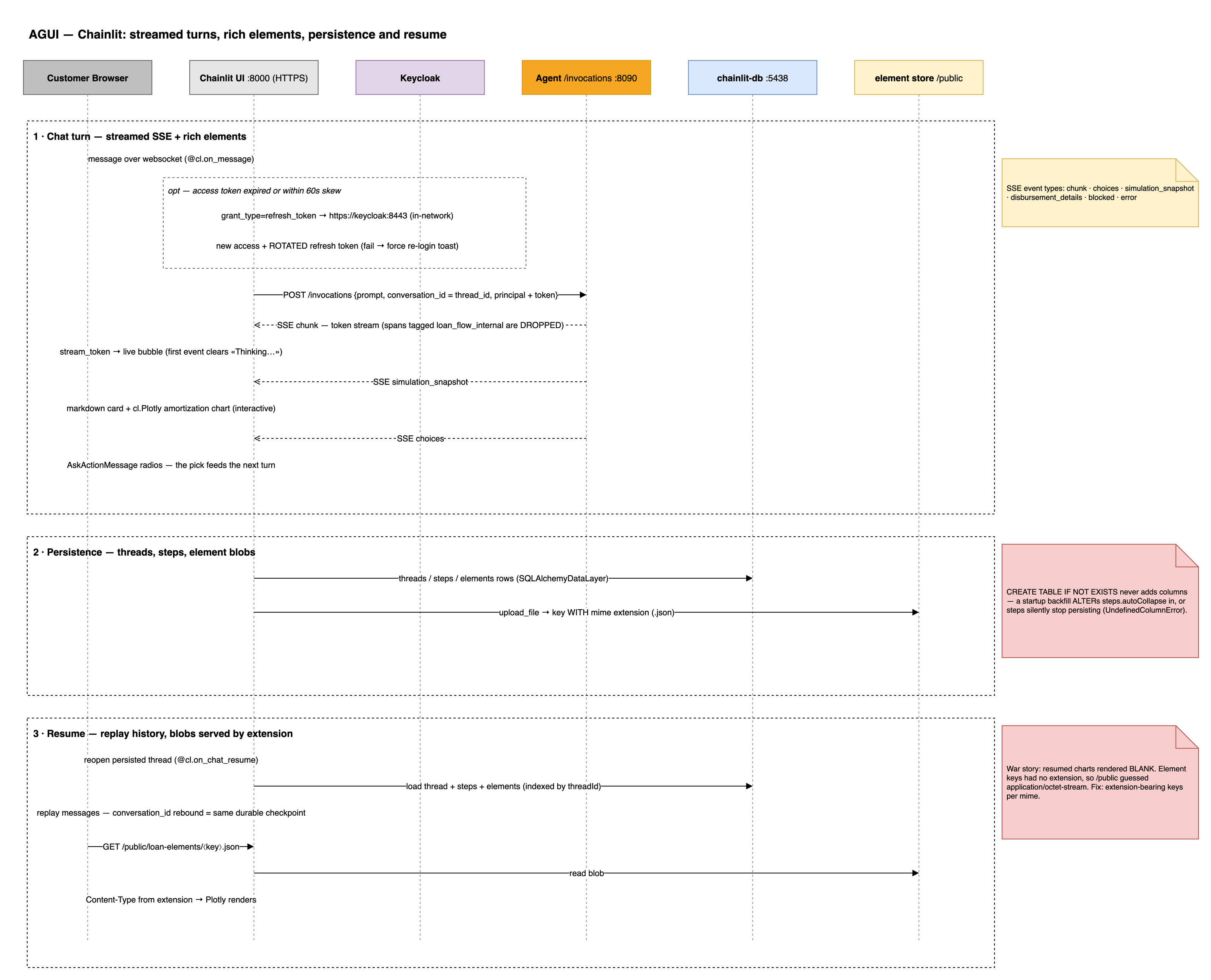
Each turn POSTs to /invocations and reads Server-Sent Events. The dispatch loop switches on a small event vocabulary — chunk, choices, simulation_snapshot, disbursement_details, blocked, error — and maps each to a UI affordance: streamed tokens into the live bubble, radio pickers via AskActionMessage, markdown cards, and the crown jewel:
await cl.Message(
    content=("Here's the full breakdown. This chart is **exactly what you'll pay** …"),
    elements=[cl.Plotly(name="amortization", figure=figure, display="inline")],
).send()
An interactive amortization chart — principal/interest split per month, balance line, a range slider — as a first-class chat element. This is the argument for a chat framework over a chat box: cl.Plotly, action pickers, and thread history come free, and the app code stays domain logic.
One streaming war story lives on the agent side but surfaces here: the flow node composes internal LLM helper calls and then appends the final message itself, so every helper answer streamed twice — once as tokens, once as the appended message. The fix is a tagging pattern (tags=["loan_flow_internal"]) with the streaming layer dropping tagged spans. If you compose LLM calls inside LangGraph nodes and stream messages mode, you will meet this bug.
Persistence: the part everyone underestimates
Chainlit’s SQLAlchemy data layer persists users, threads, steps, elements, and feedback — into the stack’s dedicated chainlit-db Postgres instance (database-per-service applies to the UI too; chat history and business data have different owners, lifecycles, and erasure stories). But the data layer creates nothing itself, and this is where two production bugs earned their scars.
Bug 1: steps silently stopped persisting. The app bootstraps the schema with CREATE TABLE IF NOT EXISTS — which never adds columns to an existing table. A database first created under an older Chainlit lacked the autoCollapse column that a newer Chainlit’s create_step INSERTs; Postgres raised UndefinedColumnError, and steps — the chat history itself — quietly failed to save. No crash. Just missing history. The fix is an idempotent migration pass at startup:
# Idempotent migrations for tables that already exist from an older schema. CREATE TABLE IF NOT
# EXISTS never adds columns, so newer Chainlit columns (e.g. autoCollapse, added in 2.11) must be
# back-filled here — otherwise create_step fails with UndefinedColumnError and steps (including the
# per-callback run steps) silently fail to persist.
_CHAINLIT_MIGRATION_DDL = (
    'ALTER TABLE steps ADD COLUMN IF NOT EXISTS "autoCollapse" BOOLEAN',
)
Bug 2: resumed charts rendered blank. Live, the Plotly figure renders perfectly. Reopen the thread a day later: an empty rectangle. Root cause: Chainlit stores element blobs under extension-less keys, and its /public file route guesses Content-Type from the filename — no extension, application/octet-stream, and the frontend’s Plotly component renders nothing. The fix — in the app’s custom filesystem storage client — appends the mime’s extension to the key at upload time, so the stored key, the on-disk file, and the served Content-Type stay consistent:
@staticmethod
def _with_ext(object_key: str, mime: str) -> str:
    """Append the mime's file extension so /public serves the right Content-Type."""
    ext = _MIME_EXT.get(mime) or mimetypes.guess_extension(mime or "") or ""
    return object_key if not ext or object_key.endswith(ext) else object_key + ext
The general lesson from both: persistence bugs are resume bugs. Everything works live, because live rendering never touches the storage path. You only find out weeks later, from a user, unless you test the reload.
Two smaller persistence notes worth stealing: the app adds its own FK indexes (Chainlit ships none beyond primary keys — a thread resume would seq-scan children), and it detaches Chainlit’s per-callback wrapper step so assistant messages persist top-level instead of orphaned under a never-persisted parent.
Resume: one id ties the whole stack together
cl.context.session.thread_id — Chainlit’s own thread uuid — is reused verbatim as the agent’s conversation_id. On resume, the UI rebinds that single id, Chainlit replays the persisted messages and elements, and the agent continues from the same durable LangGraph checkpoint. UI history and agent memory can’t drift apart, because they share one identity. (Bonus: at 36 characters it also satisfies AgentCore’s runtimeSessionId ≥ 33 requirement in cloud mode.)
[SCREENSHOT: a resumed thread showing chat history and the interactive amortization chart rendering correctly]
Conclusion
None of this is glamorous, and that’s the point. The chat frontend is a distributed-systems participant like everything else: it holds tokens that expire, writes to a database that drifts, serves blobs whose content types matter, and re-enters conversations that must resume exactly. Chainlit gives you the chrome — websockets, streaming, OAuth plumbing, thread history, rich elements — and leaves you the responsibilities: owning your schema migrations, your token lifecycle, your storage semantics, and your resume path.
Treat the AGUI as part of the architecture, test the reload and the re-login as seriously as the happy turn, and the UI stops being where your backend’s rigor goes to die.